How to Change Hair Color in Photos (Natural Results)
Thinking about a new shade? Learn how to change hair color in photos so it looks real: choosing honey blonde, copper or ash brown, picking the right blend mode, and checking roots, ends and shine.

Changing your hair color is a big decision. A full color can take hours in the salon, cost a fair amount, and take months to grow out if you don’t love it. Trying it in a photo first takes seconds.
The challenge is making it look real. Hair is full of shine, shadow and thousands of individual strands, which is why a flat color fill looks like a wig. This guide shows you how to change hair color in photos naturally, which shades to try and how blend modes make the difference.
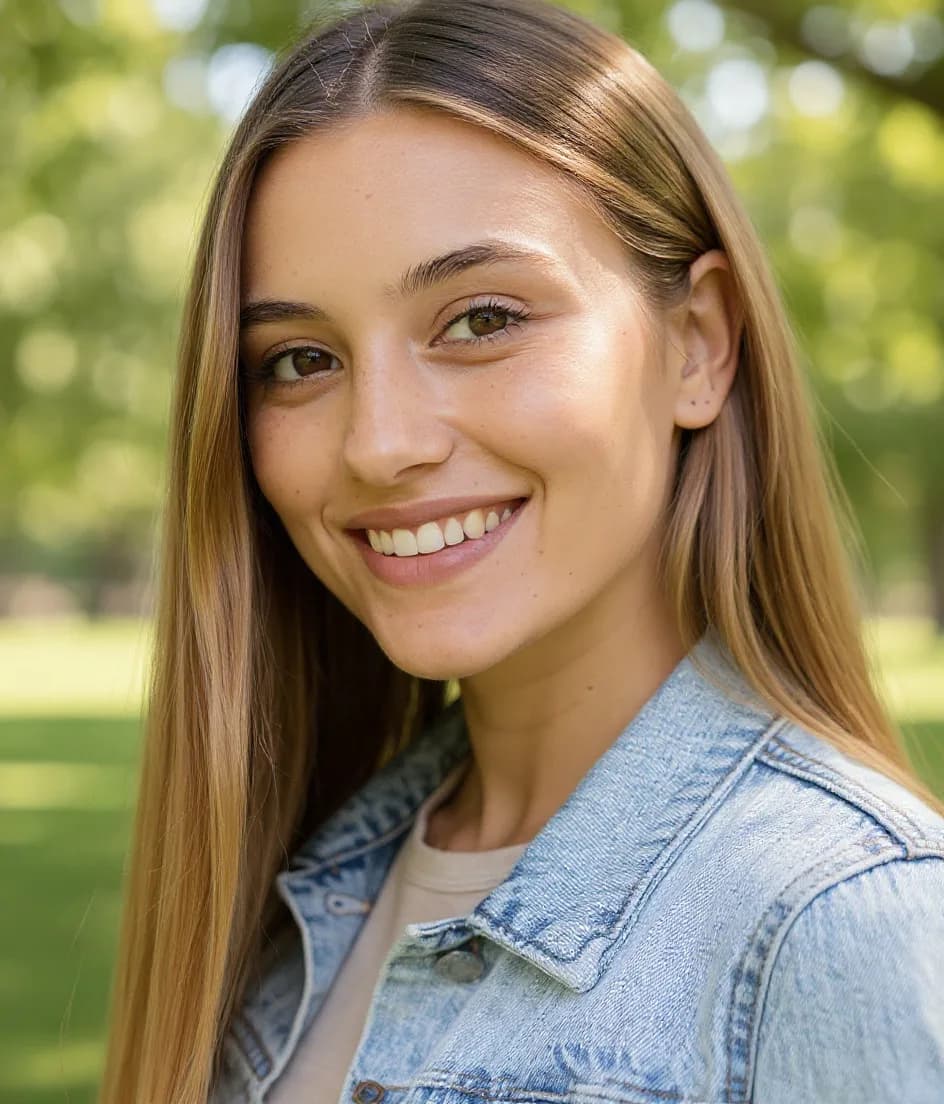
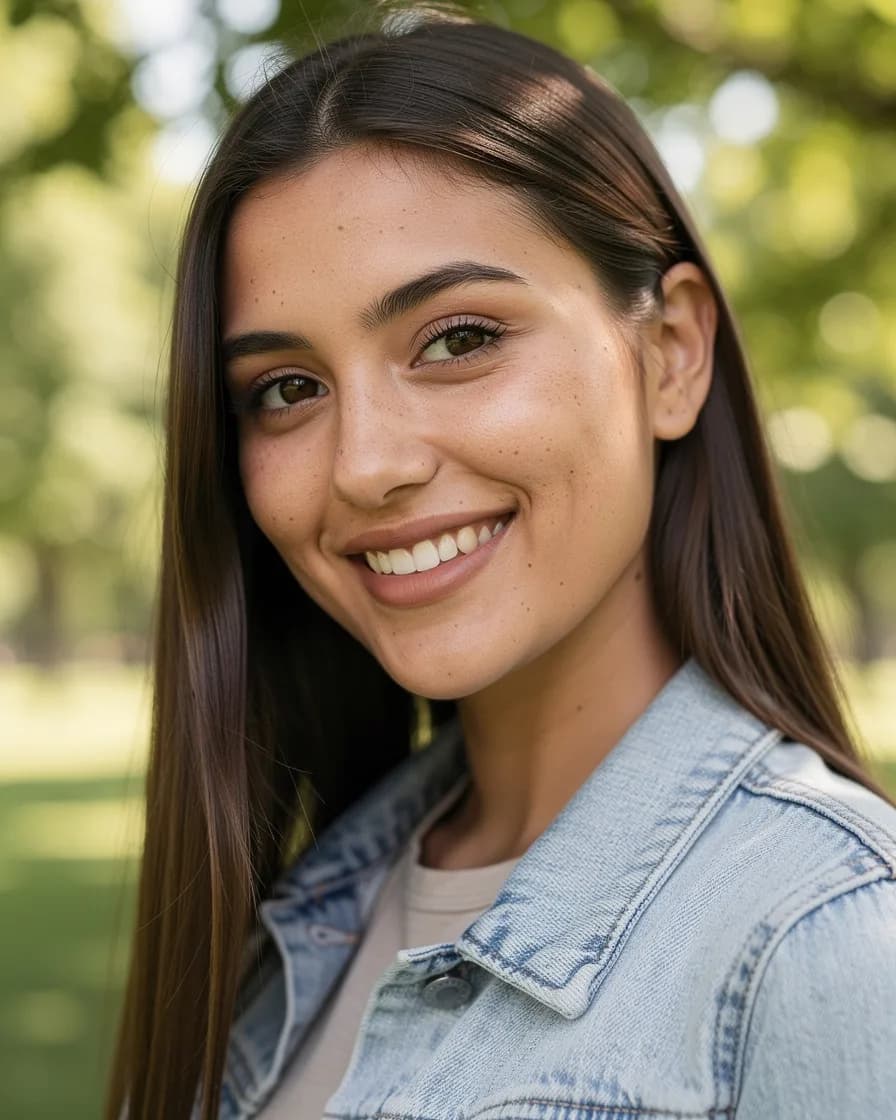
Why most hair color edits look fake
When hair color edits fail, it’s almost always for one of these reasons:
- Flat color. Painting one shade over everything removes highlights and lowlights.
- No roots. Real color, especially lighter shades, rarely looks identical from root to tip.
- Lost shine. Healthy hair reflects light. If the shine disappears, hair looks matte and artificial.
- Color on skin. A brush that bleeds onto the forehead or ears is a giveaway.
- Wrong depth. Going from very dark to very light in one step is the hardest change to make believable.
A good hair color changer detects only your hair and blends the new color into the existing light and shadow.
Understanding blend modes
Blend modes control how the new shade mixes with your real hair. FaceBodyTune offers seven:
- Natural: a dye-like result that keeps shine, shadows and darker roots. The best starting point for most people.
- Color: changes only the hue and keeps your hair exactly as light or dark as it is. Perfect for testing a tone, such as making brown hair more copper or more ash.
- Soft light: a gentle tint. Subtle on dark hair; lovely for a gloss or toner effect.
- Overlay: richer color with more contrast, good for vivid shades like burgundy or copper.
- Multiply: deepens and darkens, like a dark dye. Use it to see yourself with espresso or jet black hair.
- Highlights: colors the lighter strands for a balayage look.
- Ombré: natural roots that fade into color toward the ends.
Tip: try the same shade in Natural and Color. If Color looks better, your current depth suits you and you might only need a toner or gloss at the salon, not a full lift.
Shades worth trying
Honey blonde
Warm, golden and soft. It suits warm and neutral skin tones and looks especially natural with the Highlights blend, which mimics hand-painted balayage.
Copper and copper red
Bold but surprisingly wearable. Copper flatters fair skin with warm undertones and looks amazing against green and hazel eyes. Try Natural for a lived-in copper, or Overlay for a vivid finish.
Ash brown
A cool, smoky brown that cuts down warmth and brassiness. It suits cool and neutral undertones. Ash shades often look most realistic in Color mode, because they change tone without lightening.
Other popular choices
Chestnut and caramel are easy, low-commitment changes for brunettes. Platinum, silver and pastel shades are high-impact; test them with Natural so darker roots stay visible, which is how they look after a few weeks in real life.
Not sure which family suits you? Our seasonal color analysis guide and the free color analysis tool help you narrow it down.
How to change hair color in FaceBodyTune
The hair color tool detects only your hair, so your skin, eyes and background stay untouched. It’s free and runs right in your browser.
- Upload your photo. Open the free editor and add a photo with your hair clearly visible.
- Open the Hair panel. Under Hair color, tap a shade such as honey blonde, copper red or chestnut, or tap the plus to pick any custom color.
- Choose a blend. Start with Natural, then try Color, Highlights or Ombré to compare.
- Adjust intensity. Pull the Intensity slider down if the shade looks too strong, especially on light hair.
- Check root to tip. Zoom into the parting, the mid-lengths and the ends.
- Download. Save the photo, or save a few versions to compare side by side.
Because this runs in your browser, your photo isn’t uploaded or kept on our servers. Find out more on the hair color changer page.
Check it root to tip
Real hair color changes along the length of your hair, so check three zones:
- Roots: should be slightly darker or the same as mid-lengths. A bright, flat root looks like a wig.
- Mid-lengths: where most of the color shows. Shine should still be visible on the curve of the hair.
- Ends: often a touch lighter, especially with ombré or balayage, because ends naturally lift in the sun.
If you’re planning a big change at the salon, a realistic preview with visible roots also shows you what the color will look like six weeks later.
Photo tips and mistakes to avoid
The best photos for trying new hair color
- Hair down and visible, not tucked under a hat or hood.
- Soft daylight. Warm indoor light makes every shade look more orange.
- A plain background. Busy backgrounds can confuse hair detection around flyaways.
- A few angles. Color looks different from the front and the side. Try at least two photos.
Mistakes to avoid
- Judging blonde from one photo. Lighter shades vary a lot with light. Test in two or three photos.
- Maximum intensity. Real dye rarely covers every strand evenly. Lower the amount slightly.
- Ignoring brows. A big change, like dark to platinum, can make brows look very different. That’s normal; your colorist can tint them.
- Forgetting skin tone. If a shade makes your skin look gray or flushed, try a warmer or cooler version of it.
Taking your preview to the salon
Save your favorite version and show it to your colorist. A photo of the shade on you is far more useful than a picture of someone else. Be honest that it’s a preview: hair history, porosity and current color all affect what’s possible in one appointment.
Want to try a new cut as well? Read how to try new hairstyles on your face or try AI hairstyles to see color and cut together.
Before-you-post checklist
- Color stops cleanly at the hairline; skin is untouched.
- Roots look natural, not flat or glowing.
- Shine is still visible on the curve of the hair.
- Ends look believable for the blend you chose.
- The shade flatters your skin tone in daylight.
- You tried at least two blend modes before deciding.
Frequently asked questions
How can I see what I look like with different hair color?
Upload a photo to the FaceBodyTune editor, open the Hair panel and tap a shade such as honey blonde, copper red or chestnut. Then pick a blend mode like Natural or Highlights to see a realistic result. It’s free and runs in your browser.
What is the most realistic way to change hair color in a photo?
Use a tool that detects only your hair and blends color into it rather than painting over it, so shine, shadows and individual strands remain. Natural or Color blend modes give the most realistic results.
Can I preview balayage or ombré before going to the salon?
Yes. The Highlights blend colors the lighter strands for a balayage look, and Ombré keeps natural roots that fade into color toward the ends.
Why does blonde look fake on my dark hair in photos?
Going many shades lighter is the hardest change to show realistically. Try the Natural blend, which keeps shine and darker roots, or try a softer step like caramel first.
Try it on your own photo
Free face and body edits right in your browser — plus AI tools when you want more.
Try hair colorKeep reading

How to Try New Hairstyles on Your Face Before the Salon
Want to try new hairstyles on your face before you commit? Learn how to match cuts to your face shape, preview bobs, bangs and curls with AI, and bring the right reference to your stylist.

Seasonal Color Analysis: Find Your Season (Free 2026 Guide)
A practical guide to seasonal color analysis: what undertone, depth and contrast mean, how to tell Spring, Summer, Autumn and Winter apart, and how to test your season for free in daylight.

What Face Shape Do I Have? How to Tell in 2 Minutes
What face shape do I have? Learn how to measure your face at home, understand the six face shapes (oval, round, square, heart, oblong, diamond) and find the hairstyles, glasses and makeup that flatter each.